Wedding photography invoice template:
what to include.
A wedding photography invoice should carry your business details and the couple’s, an invoice number, the issue and due dates, line items that match the accepted proposal, tax where it applies, the payment schedule with the retainer and the balance, how to pay, and a short note of the terms. Here is that structure, then how Roviqo builds it from the proposal.
What should a wedding photography invoice include?
The sample lines use X for amounts: this guide does not suggest prices. The pricing guide covers how to set them.
Who and to whom
Your business name, address, email and phone, and the couple’s names and email. On a multi-brand studio, the brand the booking belongs to.
Number and dates
A unique invoice number, the issue date and the due date. For a schedule, the due date of this payment, with the others listed below it.
Line items
The collection and each add-on exactly as the accepted proposal named them, with quantity and price, so the invoice, the proposal and the contract agree.
Sample: “The Wedding Weekend · 1 · $X. Engagement session · 1 · $X. Fine-art album · 1 · $X.”
Tax and discounts
Sales tax where it applies to your work, shown separately or included, and any discount as its own line. Ask an accountant where you work what is taxable.
The payment schedule
The retainer and each later payment with its amount and due date, and what has been paid so far. Use the word your contract uses: retainer or deposit, not both.
Sample: “Retainer 25% · on signing · paid. Second payment 50% · 30 days before the first event. Final payment 25% · on delivery.”
How to pay
A pay-now link for card and wallets, and your instructions for a bank transfer or a cheque if you accept them, with the reference to use.
A short message and the terms
A line of thanks and one or two sentences of terms: when the date is held, what happens if a payment is late, where the full agreement lives.
Sample: “Thank you for choosing us. This invoice covers the retainer that reserves your date. Once it is paid, your date is held exclusively for you.”
The record
Keep the sent invoice, each payment and each receipt with the booking, so the couple and your accountant see the same numbers.
How should a wedding payment schedule be split?
Common shapes are half on booking and half before the wedding; three payments of 30%, 40% and 30%; or four equal payments. The first payment holds the date, the last is due before or on delivery, and every payment has a date tied to the event, not to “later”. Whatever you choose, the invoice, the contract and the proposal must say the same thing.
- 50/50: half at booking, half before the event
- Three payments: 30% / 40% / 30%
- Four payments: 25% each
- Custom dates and amounts for a multi-event wedding
How does Roviqo create the invoice?
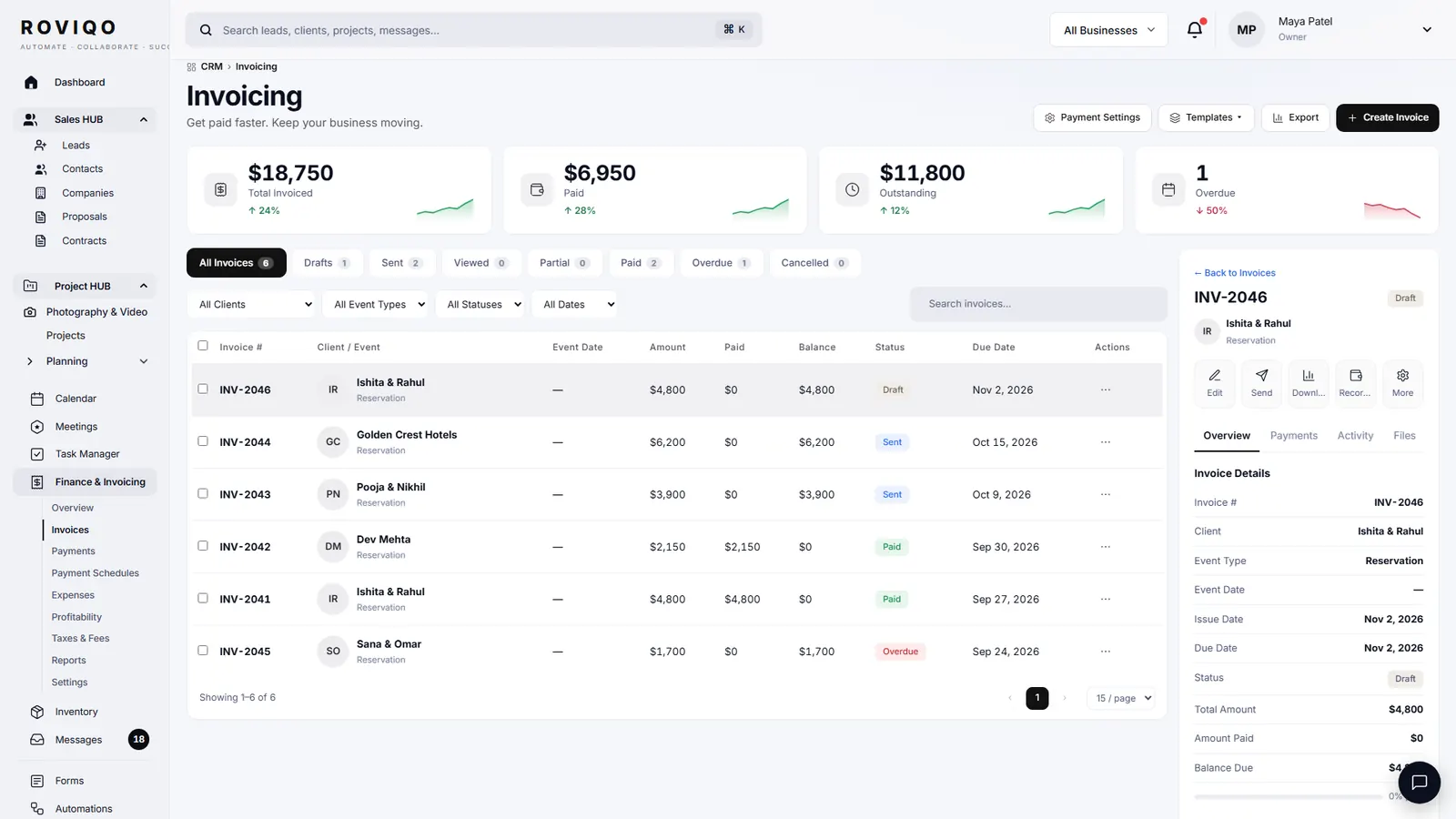
When a couple accepts a proposal, the invoice is created from its payment schedule, so the line items and the retainer already match. Create Invoice walks five steps for anything else: Invoice Details, Add Items, Payment Schedule, Notes & Settings, and Review & Send, with a live preview. Choose a kind (standard, deposit or retainer, final payment, custom), a tax profile, a currency, a client message and whether reminders go out.
- Schedule templates: 50/50, three payments, four payments, or custom; due dates follow the event date
- Card, Apple Pay and Google Pay through your own Stripe; bank transfers and cheques recorded by hand
- Reminders before each due date and a receipt after each payment, in your branding
Wedding photography invoices, answered.
The schedule is the plan: which payments, how much, and when. An invoice asks for one of them. In Roviqo the schedule lives on the proposal and the contract, and the invoice shows each payment as upcoming, paid or overdue.
It can be. Roviqo has a deposit-or-retainer invoice kind and a final-payment kind, each with its own message. Many studios send one invoice carrying the whole schedule and let the couple pay each part as it falls due.
It depends on where you work and on what you deliver; digital files, prints and albums are often treated differently. Ask an accountant. Roviqo lets you keep tax profiles by state or region, show tax separately or included, and set one as the default.
From the invoice link, by card, Apple Pay or Google Pay through your own Stripe account. Roviqo takes no fee on payments; Stripe’s standard fees apply. You can also record a bank transfer or a cheque against the invoice.
Yes. Create an invoice from Finance for any client, set its schedule and send it on its own link. Expenses, taxes, fees and reports sit beside the invoices.
Free for up to 5 active clients with every module and no card. Studio is $60 a month for unlimited active clients. Pro is $100 a month and runs up to three businesses, each with its own brand, under one login. Monthly, cancel anytime, no setup fee.
Related guides.
Invoices & payment schedules
Retainer, instalments and balance through your own Stripe, with reminders and receipts.
Deposit and retainer policy
Retainer or deposit, how much, refunds, date changes and cancellations.
How to price wedding photography
Costs, hours, the income you need, bookings per year, packages and retainers.
Proposals
Five designs, optional add-ons, the agreement and the deposit on one link.
Contract template: what to include
Twelve clauses with sample wording, and the mistakes to avoid.
Client portal & galleries
One private place for the couple: documents, payments, schedule, messages and photos.
See it with your own studio's data.
Create your studio free, import your leads, and send your first Wedding Book this week.