Software for
multi-photographer studios.
A multi-photographer studio needs software that knows who is doing what: which associate owns each enquiry, who takes the consultation, who shoots each event and who edits afterwards. Roviqo assigns leads and tasks, routes booking-link calls across the team, sends crew offers per event, and gives each person a role, with no charge per seat.
At a glance
Leads with an owner
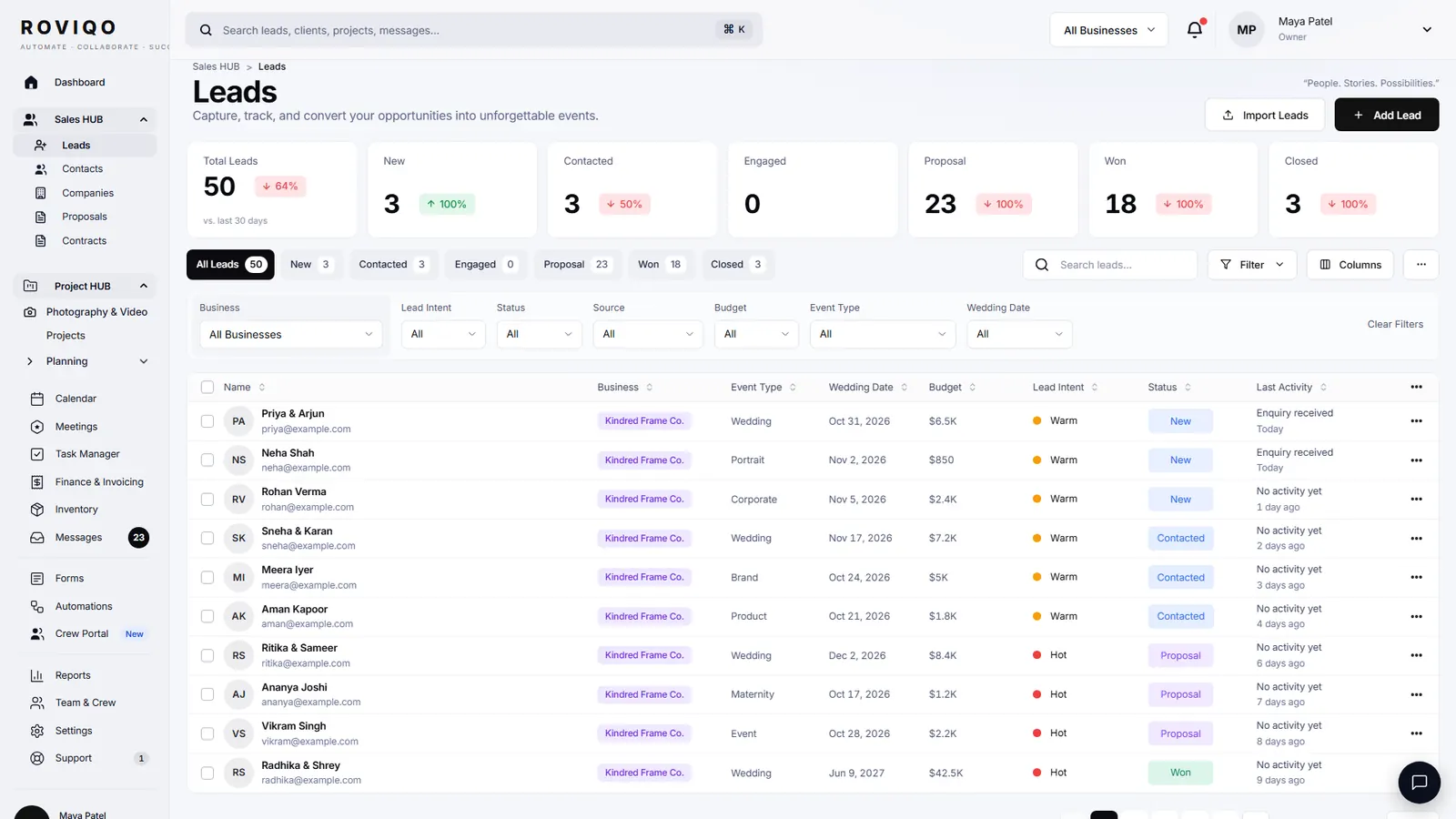
Every lead has an assignee; the list filters to Assigned to Me or one person, and a bulk action assigns many at once.
Calls shared out
Booking links route consultations by Round Robin, Collective, Priority Order or to a single team member.
Roles, not seats
Built-in roles from Owner to Freelancer, or your own, decide which parts of Roviqo each person can open.
How do I split enquiries between associates?
Assign each lead to the person who will look after it; they see it under Assigned to Me with its next action and due date. Booking links can hand consultation calls out in turn (Round Robin gives the call to whoever has the fewest bookings in the next 14 days), to everyone together, in a set order, or to one person.
- Tasks assigned to others, with To Review for work waiting on you
- Notify assignee emails the person a task is for
- Needs Attention filtered to Assigned to Me
Who can see what?
Team & Crew holds your staff and freelancers. Staff sign in with a role (Owner, Admin, Photographer, Videographer, Photo Editor, Video Editor, Planner or Freelancer, or one you create), and the role opens only its areas: leads and couples, projects, proposals and contracts, invoices and payments, tasks, team and inventory, wedding planning, reports and automation, setup and settings. An associate can run their weddings without seeing the studio’s finances.
- Invite staff by link, with the owner approving new sign-ins
- Groups with their own members, projects, availability and files
- An Availability tab for the whole team
How do I staff each event?
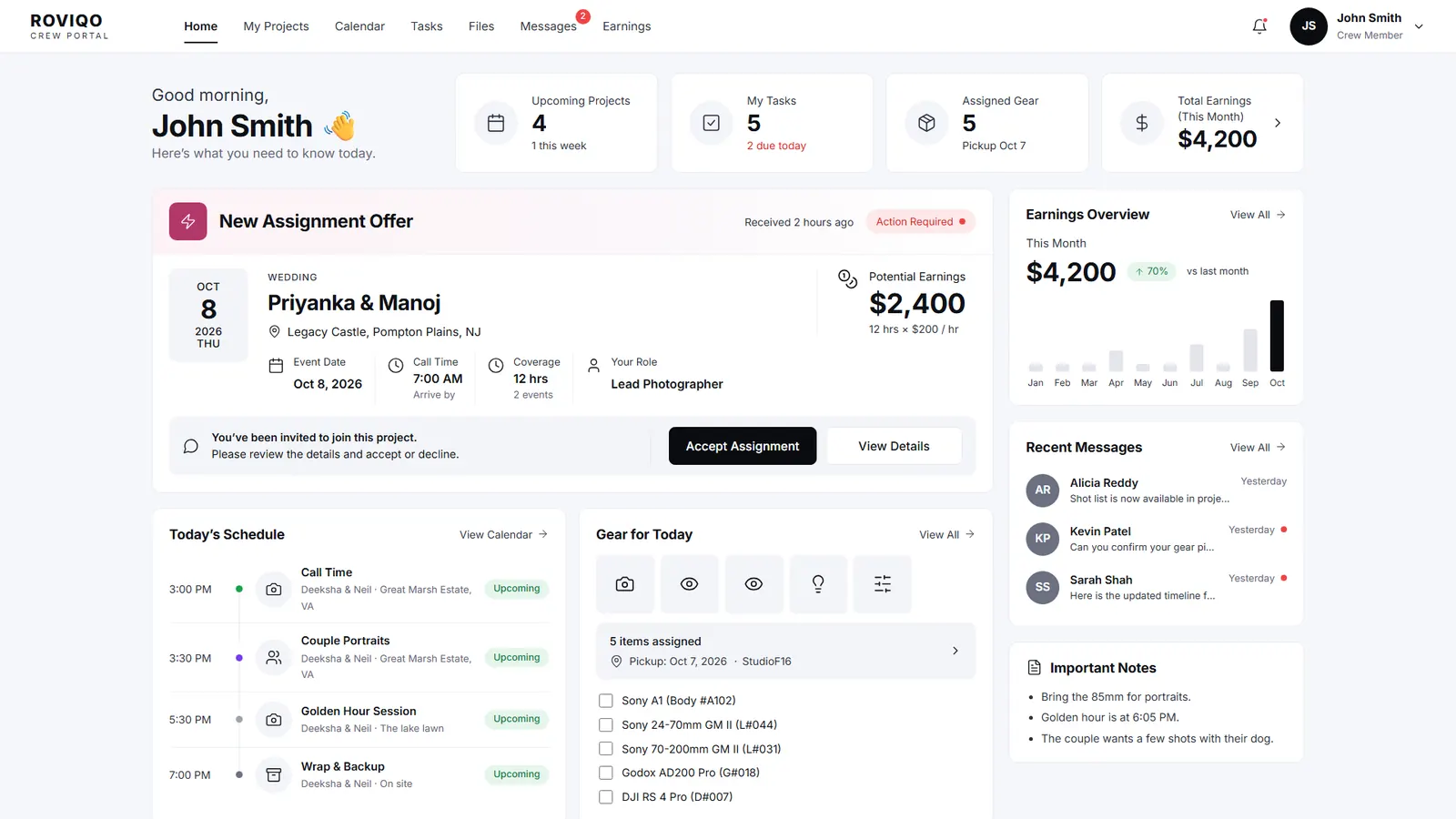
From the project’s Crew & Coverage, pencil in a lead photographer, a second shooter or a filmmaker for each event and send the offer. They have 24 hours to accept in their crew portal, with the date, times, venue and pay; an unanswered offer expires and can be sent again. After the wedding, assign the photo editor, video editor, album designer, retoucher or colourist with a due date.
- Hourly or day rates on each crew profile, with pay worked out from the hours
- Approve and mark paid; crew see Total Earned, Pending Approval, Awaiting Payment and Paid
- A call sheet email to accepted crew seven days before the wedding
What if associates shoot under another brand?
Pro runs up to three businesses under one login, each with its own name, logo, colours, email address, enquiry page, templates and team, and the All Businesses view shows every lead, project and invoice together. See one CRM for several businesses.
Studios with a team, answered.
No. Plans are priced by active clients and businesses. Staff and crew sign in on your studio’s plan, however many there are.
Yes. Give them a role with leads, projects and tasks, assign them the leads they own, and they work those from enquiry to delivery while the owner sees everything.
Each booking link has its own routing: Round Robin, Collective, Priority Order or Single Team Member. Round Robin gives the call to whoever has the fewest bookings in the next 14 days.
Yes. Staff get a sign-in with a role. Freelancers get the crew portal, where they see only the jobs they are offered, their schedule, their gear and their earnings.
Pro runs up to three businesses, each with its own brand, templates, email and team, with an All Businesses view of every lead, project and invoice.
Free for up to 5 active clients with every module and no card. Studio is $60 a month for unlimited active clients. Pro is $100 a month and runs up to three businesses, each with its own brand, under one login. Monthly, cancel anytime, no setup fee.
Related guides.
Crew portal & team scheduling
Second shooters and editors accept jobs, see call times, gear and due dates.
Several businesses, one login
A photo brand, a film brand and a planning studio, each with its own brand.
Second shooter agreement
Hiring, briefing and paying second shooters and crew, with nine clauses.
Gear inventory
Cameras, lenses and lights: who has each item and when it is due back.
Lead management
A next action and a due date on every enquiry, with Needs Attention first.
Booking links
Consultation booking pages with your own hours, buffers, notice and team routing.
See it with your own studio's data.
Create your studio free, import your leads, and send your first Wedding Book this week.