Project management software for photographers.
Photography project management software keeps everything after the booking in one place. In Roviqo a project opens when a lead is won and holds each event’s timeline, the crew, deliverables with due dates, the contract value and what is still owed, tasks and notes, with an addendum when the couple adds an event or hours.
At a glance
Opens when the lead is won
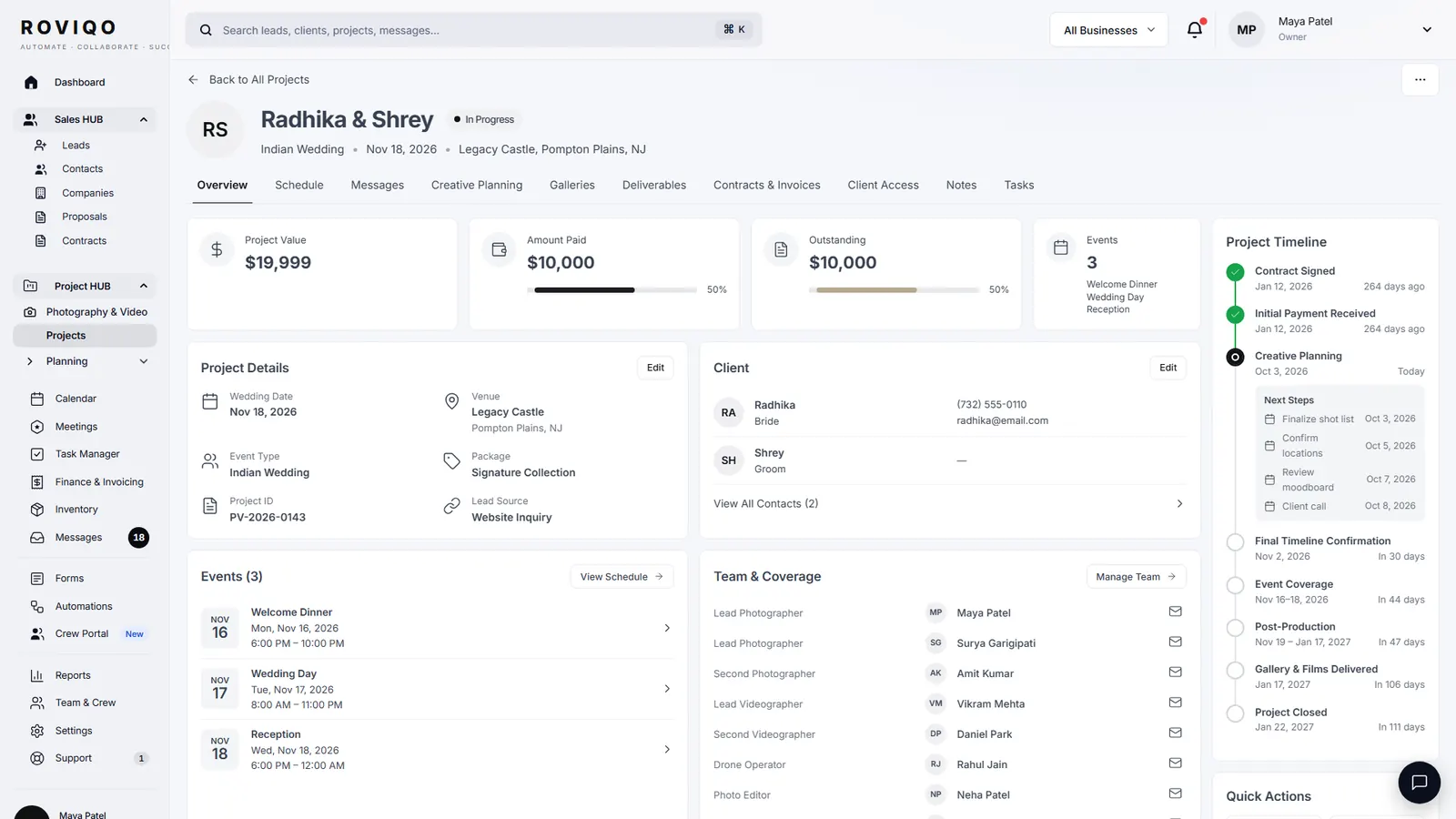
Mark a lead won, or let a signed proposal do it, and the project opens with the couple, their events and a project code.
Nine tabs
Overview, Events, Deliverables, Tasks, Crew & Coverage, Finances, Documents, Client Portal and Notes, with messages, creative planning and galleries a click away.
What needs attention
The Overview flags a payment to collect, overdue deliverables and tasks, and any event in the next 14 days with no crew on it.
What does the project overview show?
A money strip with Contract Value, Collected and Balance Due, and when the next payment falls due. A Project Timeline from Contract and Payment through Timeline, Events, Post-Production and Gallery to Closed, which flags steps running late. Then Needs Attention, the deliverables with their status and due dates, your own next tasks, and every event with its hours and the total coverage.
- Draft a payment reminder or a client update from Needs Attention; nothing is sent until you send it
- A stage for each project, from Planning and Upcoming to Post-Production and Delivered
- Open or copy the couple’s portal link from the Share menu
How do I plan each event?
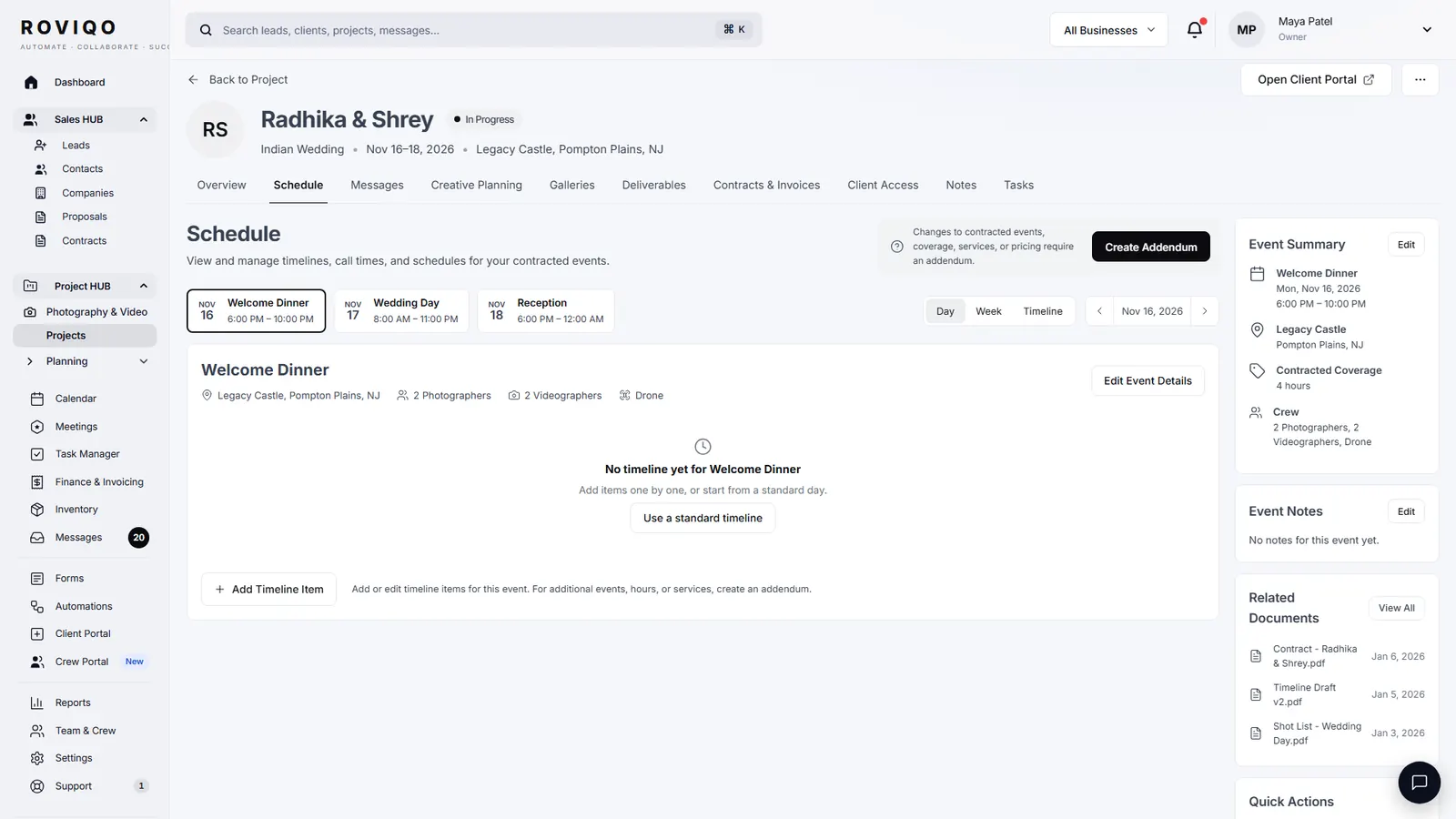
The Events tab holds each event with its date, start, end and venue, and a timeline of rows with times and places. Start from the standard wedding-day timeline and edit it, view it by day, by week or as a timeline, print it to PDF, or share it through the couple’s portal link. The couple can suggest changes from their portal; your version stays as it is until you review them.
- Contracted coverage hours and the crew beside each event
- A call sheet emailed to accepted crew seven days before the wedding
- One timeline per event of a multi-day wedding
How do tasks work?
The Task Manager shows every task across your projects as a list or a board, with tabs for All, My Tasks, Assigned to Others, To Review, Due Soon, Overdue and Completed. A task has an owner, an assignee, a due date, a priority, a checklist, tags and attachments, and moves from Not Started to In Progress, In Review and Completed. Tick Notify assignee to email the person it is for.
- Tasks linked to a project or to a lead
- Filter by project, assignee or priority, and export to CSV
- Comments on each task
What happens when the couple adds an event?
Create an addendum from the project. Pick the changes (a new event, more coverage hours, services such as drone coverage or a same-day edit, more team members, deliverables), price them, check the new project value, and send it. The couple signs by typing their full name; the new event and the priced deliverables then join the project and its value goes up. See the contract addendum guide.
Project management, answered.
Software that runs a booked job: its events, schedule, crew, deliverables, tasks, money and files, from the signed contract to the delivered gallery. In Roviqo it is part of the same app as leads, proposals and invoices, so nothing is copied across by hand.
Yes. When a lead is marked won, including when the couple signs the proposal, Roviqo opens the project with the couple and their events. Studios that run several businesses can also add a project by hand.
Yes. Each deliverable has a type (photos, video, album, prints or other), its event, a status, a due or delivered date, progress and a link. Overdue ones show on the Overview, and Deliver to Client publishes a gallery to the couple.
Yes. A project holds every event of the wedding with its own date, venue, timeline and crew, and the Overview adds up the coverage hours across them.
Crew who accept an offer see their events, schedule, tasks, files and messages in their own crew portal, not your finances. Staff see what their role allows.
Free for up to 5 active clients with every module and no card. Studio is $60 a month for unlimited active clients. Pro is $100 a month and runs up to three businesses, each with its own brand, under one login. Monthly, cancel anytime, no setup fee.
Related guides.
Crew portal & team scheduling
Second shooters and editors accept jobs, see call times, gear and due dates.
Contract addendum
When to use one, what goes in it, and sample wording.
Multi-photographer studios
Assigned leads, routed calls, roles and crew per event, with no per-seat fee.
Wedding day timeline template
A sample one-day schedule, a multi-event version, and one per event in Roviqo.
Client portal & galleries
One private place for the couple: documents, payments, schedule, messages and photos.
The client workflow, step by step
Ten stages from enquiry to the review, and what to send at each.
See it with your own studio's data.
Create your studio free, import your leads, and send your first Wedding Book this week.